- Insidr.ai Newsletter
- Posts
- Top AI Advancements, Guides & Tools August 15th 🙋🏼♂️
Top AI Advancements, Guides & Tools August 15th 🙋🏼♂️
Top AI Advancements, Guides & Tools August 15th 🙋🏼♂️

insidr.ai
August 15, 2024
Top AI Advancements, Guides & Tools August 15th 🙋🏼♂️
Wow, this one ended up a little long, however we hope you will gain some good tips and hacks from this 😄
Let’s get to it!👇
💡In this newsletter:
Chatbot Creation: Create chatbots fast and easy trained on your website.
Poll: 😎
AI Guide: 7 ChatGPT tips to save time.
AI News & Trends: NVIDIA delays "Blackwell" AI chip release, Google rehires AI experts, OpenAI withholds watermarking tool release.
AI Tools: 8 AI tools to create great video content faster.
🎥 Create a chatbot for your website trained on your website data
There are many ways and tools to make chatbots, but here is very simple way to get started experimenting with custom chatbots.
Chatbase is an easy-to-use platform to create bots for;
Customer support
Lead generation
AI personas
Chatbots for multiple platforms
and more..
So, a chatbot like this, simply put, is made up of Prompting, The Knowledge Base, and Actions.
Signup to Chatbase for free.
You will also be able to create the chatbot for free (free plan includes up to 400k characters).
Create “ New Chatbot”
You can now choose your knowledge base. To make it very simple, just take your website URL and input into the “Website" tab.
It will now crawl all the links starting with the URL you input.
You can also input specific URLs if you want.
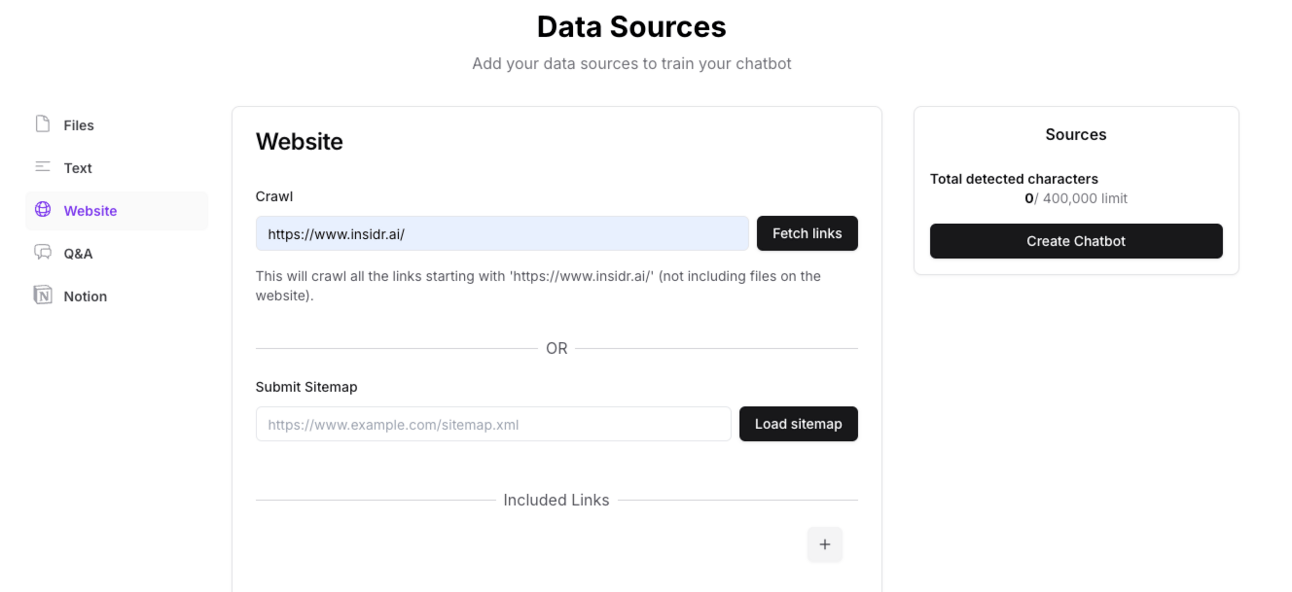
If you have a big website, there might be a lot of links and you might want to remove some of them and choose specific ones. That’s up to you.
Remove unnecessary links.
Now you can also include more for the knowledge base, like files, text or databases from your Notion.
Lastly you can customize the chatbot however you like.
For the example we just included 1 link from our website: https://www.insidr.ai/ai-tools and we have a chatbot ready. You can now click Connect and Make Public, and then deploy on your website, and even connect with other apps.
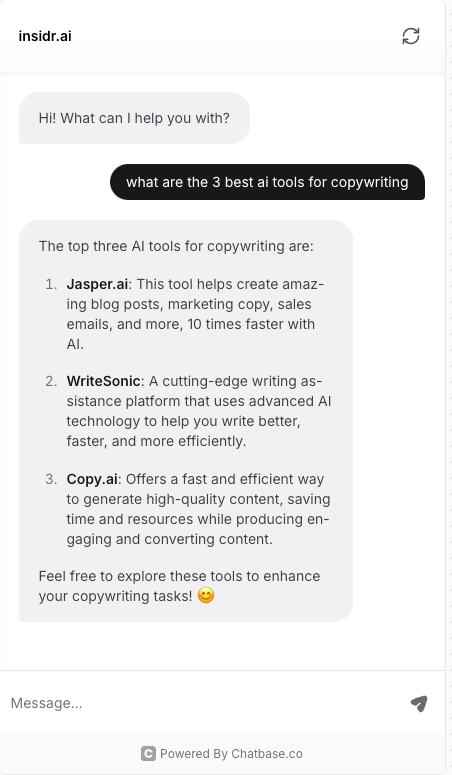
There is of course much more that can be done to customize, train it, include more links, knowledge bases, etc. - but this is simple way to get started experimenting! 🙋🏼♂️
In what area do you mostly want to learn how to use AI? |
🛠️ Top AI Tools This Week
👉 Find all the best AI tools in the: AI tools directory.
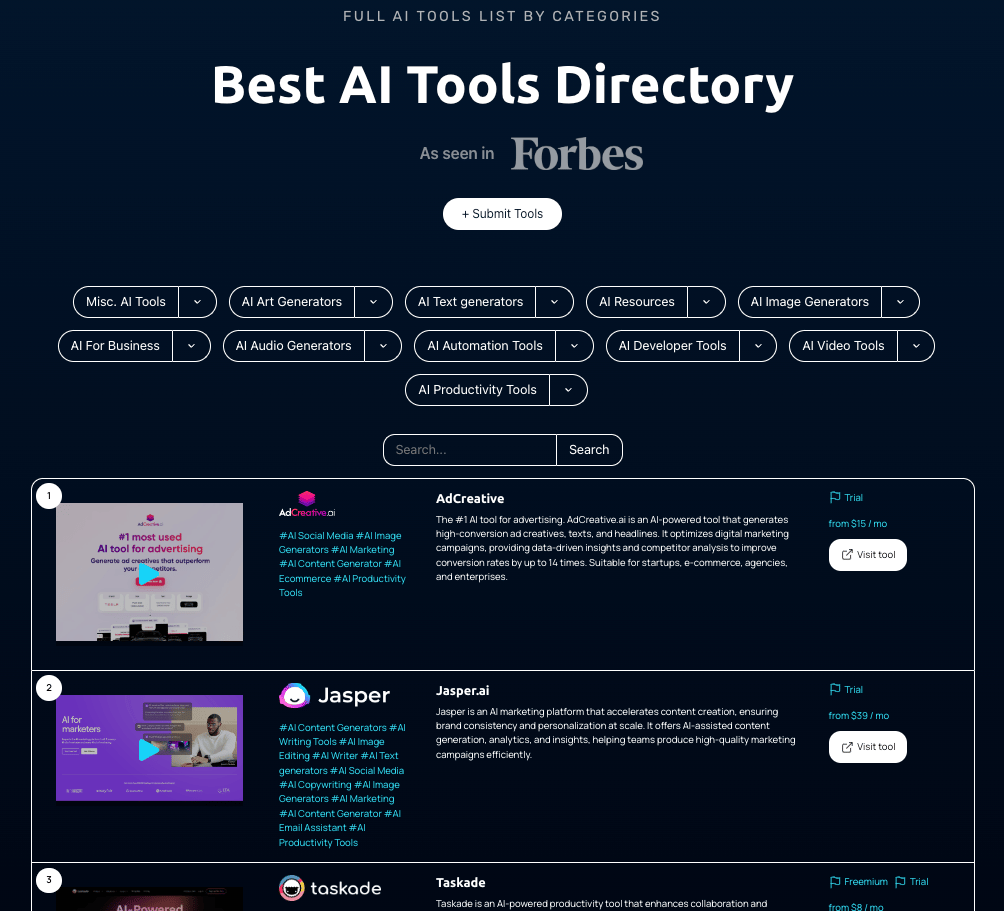
🎥 8 AI Tools to Create Great Video Content Faster
💡 Creating content can be one of the most time-consuming tasks.
Researching, planning, scripting, recording, re-recording, editing, fine-tuning, scheduling…
If you want to create more good video content faster, here are some tools that will speed up the process and improve the quality.
🤖 Google Gemini
Google Gemini is your go-to tool for generating creative video ideas, titles, and descriptions. It’s a step up from ChatGPT, especially since it’s designed by Google, making it a perfect fit for YouTube content. It helps streamline your creative process and ensures your content is always on point.
🙋🏼♂️ Subscribr
With Subscribr, you can have your video scripts crafted in under an hour. It analyzes your channel and audience to create scripts that sound just like you, saving you tons of time while maintaining your unique voice and style.
🔥 Gling
Gling is a lifesaver for video editors. It automatically cuts out mistakes, awkward pauses, and bad takes from your footage, making the editing process faster and more efficient. Just upload your video, and Gling does the rest.
🗣️ Adobe Podcast’s Enhanced Speech
Turn mediocre phone recordings into studio-quality audio with Adobe Podcast’s Enhanced Speech tool. It’s free, easy to use, and makes your audio sound professional, which is crucial for a great viewing experience on YouTube.
🎥 Opus Clip
Opus Clip makes creating short-form content a breeze. It takes your long videos, identifies the best parts, and turns them into engaging short clips with captions. It’s perfect for repurposing content across multiple platforms.
🧑🏼🦳 HeyGen
HeyGen allows you to reach a global audience by translating your videos and syncing the translations with your mouth movements. It’s ideal for creating multilingual content without needing to speak the languages yourself.
🔥 Fire Cut
Fire Cut acts as an editing assistant, handling repetitive tasks like cutting out pauses and adding captions. It also creates video chapters, saving you from doing these tasks manually and letting you focus on the creative aspects of editing.
📷 Photoshop's Generative AI
Photoshop's Generative AI lets you add elements to your videos or thumbnails that weren’t there when you filmed, like adding a plant pot to your desk. It’s also great for creating eye-catching thumbnails quickly.
🤖 7 ChatGPT Tips to Save Time
💡 Ever since ChatGPT came into our lives, there has been many ways to save a lot of time on all kinds of tasks.
Let’s take a look at 7 ways you can use ChatGPT daily to save time.
👉 Btw: here is an advanced prompt-guide with a prompt-formula if you need more context on how to prompt better.
🧑🏼🦳 Personal Assistant for Daily Scheduling
How It Works: ChatGPT can serve as a digital personal assistant to help organize and optimize your daily schedule. You provide it with the tasks you need to complete, your available time, and any specific preferences or constraints (e.g., needing to pick up kids at a certain time or wanting to watch a show in the evening).
Implementation: Start by listing all the tasks you need to accomplish in a day. Then, tell ChatGPT your preferences, such as preferred working hours, breaks, and any fixed appointments. ChatGPT will then generate a detailed schedule, which you can refine as needed. This tool helps you stay on track and ensures you make the most of your day.
Tip: Use ChatGPT to plan weekly schedules, including exercise routines, work blocks, meal planning, and even relaxation time, etc.
📝 Summarizing Content
How It Works: ChatGPT can quickly summarize lengthy texts, such as books, articles, or even videos, into concise summaries. This feature is particularly useful for professionals and students who need to digest large amounts of information in a short time.
Implementation: Simply paste the content you need summarized into ChatGPT, and specify how detailed you want the summary to be. For instance, you can ask for a brief 500-word summary or a more detailed breakdown of key points.
Tip: After getting a summary, you can ask follow-up questions to go deeper into specific sections that interest you.
✍🏻 Writing Emails in Your Style
How It Works: ChatGPT can be trained to emulate your writing style, making it easier for you to draft emails, messages, or even social media posts. This can be particularly useful for maintaining a consistent tone in professional communications or simply saving time on everyday writing tasks.
Implementation: Start by providing ChatGPT with examples of your past writing, such as emails or blog posts. Then, when you need to draft a new message, instruct ChatGPT to write it in your style. You can specify the tone (e.g., formal, casual) and any other requirements.
Tip: Use this feature to draft responses quickly, especially for routine emails. You can make small edits to the drafts generated by ChatGPT to personalize them further before sending.
🗣️ Learning a New Language
How It Works: ChatGPT can act as an interactive language tutor, helping you learn vocabulary, grammar, and sentence structure in a new language. It can also engage in conversations with you, simulating real-world practice.
Implementation: Choose the language you want to learn and instruct ChatGPT to teach you. You can ask it to introduce new vocabulary, correct your sentences, or have a dialogue in the target language. For example, ask ChatGPT to generate sentences using new words you’ve learned, or to role-play a conversation in a coffee shop.
Tip: Combine this with other language learning tools, like flashcards or language apps, for a well-rounded approach. Use ChatGPT to clarify doubts or practice specific scenarios, like ordering food or asking for directions.
🌅 Travel Planning
How It Works: ChatGPT can help you plan trips by creating detailed itineraries based on your preferences. Whether you want to visit certain attractions, dine at popular restaurants, or stay within a specific budget, ChatGPT can organize it all.
Implementation: Start by providing ChatGPT with your travel dates, destination, budget, and any specific activities or attractions you’re interested in. ChatGPT will generate a day-by-day itinerary, complete with suggestions for sightseeing, dining, and accommodations.
Tip: Ask ChatGPT to refine your itinerary by adding or removing activities, adjusting for travel times, or focusing on your interests, like cultural experiences, outdoor adventures, or culinary tours.
📄 Content Creation Support
How It Works: ChatGPT can help streamline your content creation process by brainstorming ideas, generating outlines, writing drafts, and even improving existing content. Whether you’re writing blog posts, creating social media content, or scripting videos, ChatGPT can be a valuable tool.
Implementation: Describe the type of content you want to create and provide any specific requirements (e.g., target audience, key messages). ChatGPT can then generate ideas, suggest titles, draft posts, or even refine scripts. For example, if you're creating a blog post, ChatGPT can outline the main points and even write sections of the post.
Tip: Use ChatGPT to generate multiple content ideas or variations, which you can then choose from or combine. This is particularly useful for keeping your content fresh and engaging.
👨🏼🏫 Learning Anything Quickly
How It Works: ChatGPT can be your personal mentor for learning new skills or subjects, providing step-by-step guidance tailored to your pace and schedule. Whether you want to learn coding, photography, or business management, ChatGPT can help.
Implementation: Assign a specific role to ChatGPT (e.g., “You are an experienced coding instructor”) and ask it to create a learning plan for you. Specify your time availability and goals, and ChatGPT will generate a customized schedule, complete with exercises and resources.
Tip: Break down complex topics into smaller, manageable lessons with ChatGPT, and ask it to quiz you on what you’ve learned.
🙋🏼♂️ AI News and Advancements
Here are some of the most interesting AI developments this week:
NVIDIA's AI Chip Delays: NVIDIA has delayed the release of its "Blackwell" B200 AI chips due to a design flaw, pushing back delivery by at least three months. This delay could impact major cloud providers like Microsoft, but analysts believe it won't significantly hurt NVIDIA's dominance in the AI chip market (The AI Track).
OpenAI's Watermarking Tool: OpenAI has developed a tool to detect AI-generated content, aiming to address concerns about AI misuse. However, they have chosen not to release it publicly yet due to financial concerns and the need for further development (The AI Track).
Google's Strategic Moves in AI: Google has re-hired former engineers who co-founded Character.AI, bringing their expertise back to enhance Google's conversational AI capabilities. This move is expected to strengthen Google's position in the competitive AI landscape (The AI Track).
Mistral AI and NVIDIA Collaboration: Mistral AI, in partnership with NVIDIA, unveiled the NeMo model, a 12-billion-parameter AI model with a large context window of up to 128,000 tokens, showing state-of-the-art performance in reasoning and coding accuracy (Artificial Intelligence News).
Impact of AI on Robotics: Recent advancements in integrating language models with robotics are making robots more flexible and capable of interacting effectively with the real world. Models like PaLM-E and RT-2 are at the forefront of this development (AI Index).
Have a great weekend, and we’ll talk soon 🚀
Best Regards,
Lasse Linnes, CEO Insidr.